A blog about free research software, alternative to commercial paid software.

One way to help people is to share your knowledge with those who could benefit from it. As a researcher , constant effort to solve scientific problems have exposed me to various scientific resources that can be accessed free of charge. Especially these knowledge is useful to labs and institution unable to access expensive software or novice users due to lack of expertise. In this blog, I have provided a comprehensive list of freely available softwares, alternative to commercial software. I shall share with you all that I have learned, as I make the changes or learn something new, I shall document them. Hope this blog will help those finding the way………….

Research software and books

Apr 16, 2011

Interactive software tool for optimal sequence alignments with dynamic programming.

ResearchBlogging.org

Dynamic programming (DP) is an optimizing strategy commonly used in various discipline in science. It is widely used in biology to calculate optimal alignment between pairs of protein or DNA sequences. DP is so important, that it is core of many software applications available today for sequence analysis. DP algorithm is essential topic in many undergraduate and graduate bioinformatics course. Although simple in formulation, DP is not that easy for students to learn.

Sequence alignment teacher (SAT) is a simple software, which interactively calculates the DP matrix in real time. Also SAT visually illustrates the consequence of tweaking the various parameters of the algorithm.


1) The user can visualize and modify the values in the similarity matrix and the gap opening/extension penalties.

2) The user can generate a report of the current data and results in PDF format.

3) The user can get filled DP matrix with the backtrace path of the currently selected optimal alignment.


Ibarra, I., & Melo, F. (2010). Interactive software tool to comprehend the calculation of optimal sequence alignments with dynamic programming Bioinformatics, 26 (13), 1664-1665 DOI: 10.1093/bioinformatics/btq252

Papermaker: An easy way to validate scientific publication.

ResearchBlogging.org


A well written scientific publication has high chance of getting through the peer review process. Research publication has to comply with standards concerning the document format, the use of language and the citation of prior work. Once the manuscript is written in loosely structured natural language by the researcher, the manuscript has to be validated for

1) Proper use of acronyms and their definitions.

2) Spellings

3) GO and MeSH terms

4) References

Papermaker receives a scientific manuscript via web interface, analyses the publication, evaluates consistency parameters and interactively delivers feedback to the author. It performs the task of spelling checks, analyses the proper use of acronyms and their definitions. Further it provides Gene Ontology (GO) and Medline Subject Headings (MeSH) categorization of text passages, the retrieval of relevant publications from public scientific literature repositories, and the identification of missing or unused references. Thus automated analysis of scientific literature can support authors in writing their manuscripts.

Rebholz-Schuhmann, D., Kavaliauskas, S., & Pezik, P. (2010). PaperMaker: validation of biomedical scientific publications Bioinformatics, 26 (7), 982-984 DOI: 10.1093/bioinformatics/btq060

Apr 11, 2011

Interactive software tool for optimal sequence alignments with dynamic programming.

ResearchBlogging.org

Dynamic programming (DP) is an optimizing strategy commonly used in various discipline in science. It is widely used in biology to calculate optimal alignment between pairs of protein or DNA sequences. DP is so important, that it is core of many software applications available today for sequence analysis. DP algorithm is essential topic in many undergraduate and graduate bioinformatics course. Although simple in formulation, DP is not that easy for students to learn.

Sequence alignment teacher (SAT) is a simple software, which interactively calculates the DP matrix in real time. Also SAT visually illustrates the consequence of tweaking the various parameters of the algorithm.


1) The user can visualize and modify the values in the similarity matrix and the gap opening/extension penalties.

2) The user can generate a report of the current data and results in PDF format.

3) The user can get filled DP matrix with the backtrace path of the currently selected optimal alignment.


Ibarra, I., & Melo, F. (2010). Interactive software tool to comprehend the calculation of optimal sequence alignments with dynamic programming Bioinformatics, 26 (13), 1664-1665 DOI: 10.1093/bioinformatics/btq252

Mar 7, 2011

Science blogger vs Scientist blogger: The debate continues…

This issue has been covered by many posts, probably many times. Let’s analyze the view of prominent blog authors on this topic.

Most of the science blogs that we see today are not necessarily by professional scientist. So you have the science blogs by Writers/authors/ Journalists who may have experience and a degree in science, so called type I bloggers. And there are blogs by researchers /scientist who from their busy schedule take time off to write science for general audience (TypeII).

The post by “Highly Allochthonous” draw our attention to two research papers in the journal “Nature” on the affects of human-caused global warming on extreme precipitation events. Here are the first lines of each of those features.

“The varying distribution of fresh water across the globe, involving complex patterns of rainfall in space and time, crucially affects the ecosystems and infrastructure on which human societies depend”

“Climate change may be hitting home.”

It is not difficult to make out which of those stories was written by an academic scientist and which was written by a science writer. Reading both the sentence carefully you will find both have strength and weakness (Read more). There are plenty of other examples where in which these differences in the culture of written expression between scientist and science writers can be seen.

Let’s analyze the situation in sufficient detail. A scientist is someone who does scientific research for living, publishes in peer-reviewed journals and often funded by granting agencies. Once a research paper is published in a peer reviewed journal it is read by audience from related field. Often, the audience of research article is limited to researchers working in the same niche area. Other ways of communication is through conferences and other events; again the interaction is limited to peers. Now suppose a scientist publishes path breaking finding in a reputed journal then the scenario is different. Here the story is picked up by a science journalist to make it a news headlines in major newspapers and science magazine. So the point to note is that a scientist in general is no way in direct communication with larger audience other than peers.

A good scientist must make an effort to communicate his work to peers as well as larger audience. Engaging the ‘wisdom of the crowds” can help a scientist in many ways. Blogs serve as a nice platform to publically work through ideas and receive critical commentary that would ever be not possible only with peer review. Discussing published article online can have remarkable impact and increase the visibility of your research work. The best example is the Blog “Cognitive daily” with 100,000 page views a month. This by far has more views than for a book or high impact research publication in the same area. It is matter of time, that research blogging will eventually give rise to new breed of scientist writers, who can write peer reviewed research article as well as write article explaining the practical application or the advancement in knowledge that his research has contributed to wider nonscientific audience .

Feb 21, 2011

Academic Search Engine Optimization


Websites have to be search engine friendly and  easily accessible for crawling and indexing. The process of making the website or blog search engine friendly is called as search engine optimization (SEO). All webmasters are familiar with the term SEO. However for researchers and academician SEO may not be a familiar term. I was unaware about use of SEO in academics, and always ignored it while writing research publication until recently. I will introduce you to the concept of academic search engine optimization.

“Academic search engine optimization (ASEO) is the creation, publication, and modification of scholarly literature in a way that makes it easier for academic search engines to both crawl it and index it.”

Unlike website SEO, ASEO is different in following ways; One of the major player in the search engine market is google in many countries, so it is sufficient to optimize your website for google. However this is not true for scholarly article search, a researcher has to optimize his article for several search engines to name a few pubmed, google scholar, SciPlore.org etc. Second, a webmaster can alter the webpage by adding or deleting keywords, links and employ other tactics that suits the ranking algorithm. However for scholarly authors once the article is published that’s the end and therefore any sought of SEO has to be performed before submitting to the editorial for review. Other major difference is that most of the academic search engines do not index a document’s full text but instead index only the title and abstract. Hence the title and abstract of the research article is of utmost importance.

How do you optimize your research article for academic search engines?

Choosing target keyword:

First you should be sure about the most relevant keyword for your article. Next is checking the competition for this keyword term in google. There are tools that help in selecting the right keywords, such as Google Trends, Google Insights, Google keyword. It is wise to choose a keyword that is less competitive. Further it is advisable to search various academic search engine with the keyword of your interest. If the search returns hundred of document then you are dealing with highly competitive keyword, so select a keyword with less competition.

Writing the article keeping the keyword in Mind:

When you write an article you should use the keyword in title, abstract and body of the text. However you should not mention the keyword so often out of context, this would annoy the readers. It is also a good idea to use variant forms of the keyword as well as Synonyms of important keywords, so that the article can be found by someone who does not know the most common terminology used in the research field. Keyword text embedded in raster graphics (*.bmp, *.png, *.gif, *.tif, *.jpg) are not indexed by search engines . This is true for figure legends, figures and tables submitted in the above mentioned electronic form. However text in vector graphics are indexed.

ASEO approach can help academic search engines understand and index the content of research papers easily and make the content available to readers.  No doubt the content of a research article is what determines the impact, in addition ASEO could help in increasing the visibility.

>>continue reading: Who is citing whom; A comparison of popular citation tracking tools.

Feb 13, 2011

Molecular Editor

A molecule editor is a computer program for creating and modifying representations of chemical structures. Two dimensional molecular editors are used to  to generate two-dimensional (flat) representations of molecules and chemical reactions that can be used as illustrations or for querying chemical databases. While three dimensional molecular editors are used to build molecular models. Most molecule editors use proprietary file formats, but most can read and write several file formats, including SMILES. The file created by molecular editor can be displayed in a molecular graphics tools.

Some commonly used molecular editor programs are
  
     ACD/Chemsketch
       Ascalaph  
       ISIS/Draw
       MarvinSketch

Feb 11, 2011

List of free molecular viewers

Given here are list of freely available molecular viewer with outstanding features. Individually comparing the features of each of these programs are really too much of work for me. Most of these programs have general features including standard representation ( ribbon, ball and stick, space filling etc) and various coloring features.


Cn3D Integrated sequence alignment view; embeddable
Chime Widely used; structure editing; electrostatic maps; embeddable
Chimera Popular; integrated sequence alignment viewer (EDM, MD)
DS Visualizer Free version of Accelrys’s powerful viewer/editor program
ICM-Browser High quality images; integrates with sequence alignment viewer
IMOD Tomogram alignment, display, segmentation (EDM, optical)
Jmol Widely used; embeddable
KiNG Generic tool for creating ‘kinemages’
Mage Generic tool for creating ‘kinemages’; allows structure editing
Molscript Useful for preparing manuscript images
MolSurfer Shows macromolecular interfaces, for example, by electrostatic potential
MOLMOL Many features, particularly suited for NMR structures
OpenAstexViewer Embedded in many PDBe (see below) services
ProSAT2 Displays sequence features on three-dimensional structure
PMV Dynamically extensible; multiple structures, large assemblies  (MM)
PyMOL Widely used; embeddable; high-quality images (EDM, MM)
RasMol Widely used; fast; scripting
Raster3D High-quality, photorealistic rendering
SPICE Adds DAS features to three-dimensional structures
STRAP Editor for structural alignments of proteins (HM)
Swiss-PdbViewer Integrated sequence view (EDM, MM)
VMD Widely used; extensible, many add-ons (EDM, MD, MM, NMR)
Yasara
Innovative ‘virtual reality’ graphical user-interface (EDM, MM, NMR)


Abbreviations: EDM, electron density maps; HM, homology modeling; MD, molecular dynamics; MM, molecular modeling and molecular orbital visualization; MRI, magnetic resonance imaging; NMR, nuclear magnetic resonance; optical, optical microscopy.


Feb 10, 2011

Molecular graphics overview

Molecular Visualization is the process of interpreting visual images of molecules. Molecular graphics refers to a technique for the visualization and manipulation of molecules on a graphical display device. Advancement in computational research has changed the way molecular structures are presented and displayed.  In this section I will discuss about various graphical visualization and manipulation tools used in chemical and biological research. 

All molecular graphics program reads a particular molecular file format and then translates these into a picture according to the representations specified. Besides moleular graphics programs can also be used to map and display molecular properties.

Feb 7, 2011

Scientific writing in MS word

Jan 30, 2011

Latex Vs Word


Research in any field is incomplete unless the results are disseminated to the wider community. Publishing is important for yourself, your organization, your scientific colleagues and your funders. It improves your career, since your work will be seen as good quality and reliable. In this section of the blog I will discuss information regarding freely available writing and bibliography management software, Tips and tricks to write scientific articles, good resources and online article to learn scientific writing.


The choice of a document design system is a huge decision for any researcher. Two fundamentally different systems dominate the market for producing research and technical documents: Microsoft Word and LaTeX (or TeX for the most proficient users). In Microsoft Word, the writer can immediately see where on each page the text, figures, equations, etc., that he or she adds will appear. While latex needs,  entire  text and the references to all graphical elements into a coded text file, which then is compiled into a final document. The LaTeX software handles the pagination, spacing, margins, orphan control, figure placement and many other small details and so the document looks professional even when prepared by a novice. In addition, LaTeX is greatly suited for writing large manuscripts. Even a thousand-page book full of graphics can be compiled with LaTeX using very modest hardware.


Recommending a  single document system is difficult since  different fields use different tools, and since most research teams now span disciplines, deciding on a single authoring tool becomes critical. For example, in business, law, medicine, and most professional communication, Microsoft Word unquestionably dominates. However, Latex is the choice in certain fields of hard sciences, like mathematics, physics, or engineering.


Why to use Latex?


Since word is mostly preferred based on the ease of use, if at all if you need to use latex you will consider its advantage.


  •     LaTeX enforces proper typesetting.


  •     LaTeX is stable. It does not crash that easily and has low machine memory requirements.

  •     Automatic figure positioning is far more efficient in LaTeX than in Microsoft Word.


  •      LaTeX does provide some advantages over Microsoft Word, particularly for very long and very complex technical documents.


Advantages of Microsoft Word over LaTeX

  •      Microsoft Word is ubiquitous. In most cases, co-writing with groups from different companies or across industry and academia is a lot easier with Microsoft Word than with LaTeX.


  •     Such features as spell-check, grammar check, WYSIWYG, track changes, word count, line numbering, and the manuscript marking system are more powerful and convenient with Microsoft Word.


  •      Microsoft Word is easier to use for novices.


  •      Microsoft Word now has many handy multi-authoring tools built in.


  •     Reuse of figures and text is easier when using Microsoft Word and PowerPoint together.


Jan 29, 2011

Overview

Most of the research software used for advanced scientific studies requires strong hold over theory as well as many of them are command based. Even though sometimes the graphic user interface is available, it has to be installed separately. In some case one software with graphic user interface is commercial. Online servers, offers a web-based, easy to use interface that handles all aspects that a normal software can do. User friendly interface of these servers ensures that calculation and result evaluation can be carried out by researchers coming from all fields of science. Nevertheless these webservers are not substitute for original softwares, I recommend to use the software directly.

Here I have compiled a list of web servers that are useful to researchers, I have tried to include as many as I know.

Jan 25, 2011

Bibliography

BibSonomy

BibSonomy is a social bookmarking and publication-sharing system. It aims to integrate the features of bookmarking systems as well as team-oriented publication management. BibSonomy offers users the ability to store and organize their bookmarks and publication entries and supports the integration of different communities and people by offering a social platform for literature exchange.
 http://www.bibsonomy.org/

CiteULike

CiteULike is based on the principle of social bookmarking and is aimed to promote and to develop the sharing of scientific references amongst researchers. In the same way that it is possible to catalog web pages (with Furl and del.icio.us) or photographs (with Flickr), researchers can share information on academic papers with specific tools (like CiteULike) developed for that purpose.

http://www.citeulike.org/

Connotea

Connotea is a free online reference management service for scientists, researchers, and clinicians, created in December 2004 by Nature Publishing Group. It is one of a breed of social bookmarking tools, similar to CiteULike and del.icio.us, where users can save links to their favourite websites.

http://www.connotea.org/

Mendeley

Mendeley is a desktop and web program for managing and sharing research papers, discovering research data and collaborating online. It combines Mendeley Desktop, a PDF and reference management application (available for Windows, Mac and Linux) with Mendeley Web, an online social network for researchers.

http://www.mendeley.com/

WizFolio

WizFolio is a web based reference management software for researchers to manage, share their research and academic papers and generate citations in scholarly writings. It uses plug-ins (HTML parsing technology) to collect bibliographic information, videos and patents from webpages.

Enthought python


Python is a great programming language and has several libraries and packages that can be used as a tool in scientific discipline from mathematical sciences to bioinformatics. But installing various libraries and packages for specific functionality can be needlessly complicated and frustrating. The basic version of  python lacks all the libraries needed for scientific  application for researchers. Now the obvious question is looking for a python version that has all these pre-built  libraries installed .

Enthought Python Distribution (EPD) comes loaded with all sorts of tools and functionality needed for scientific computation for researchers. EPD is produced and supported by Enthought, a scientific computing company that creates and uses very powerful tools for data analysis and visualization for research. EPD is availabe for free to academics. The academic version of EPD is a fully functional installation of the software that can be used indefinitely by students and employees at degree-granting and research institutions. Included in the EPD distribution are about 75 or more Libraries various application.


Jan 15, 2011

Structural Biology


ModWeb:

Modweb is a Server for Protein Structure Modeling.
Website:     https://modbase.compbio.ucsf.edu/scgi//modweb.cgi

What if web server:

The program WHAT IF provides nearly 2000 options in fields as diverse as homology modelling, drug docking, electrostatics calculations, structure validation and visualisation for researchers The what if web server gives everybody access to some of the options available in the what if program.

Website : http://swift.cmbi.ru.nl/servers/html/index.html

Swiss-Model

SWISS-MODEL is a fully automated protein structure homology-modeling server, accessible via the ExPASy web server, or from the program DeepView (Swiss Pdb-Viewer). The purpose of this server is to make Protein Modelling accessible to all researchers WorldWide.

Website : http://swissmodel.expasy.org/

ESyPred3D 

ESyPred3D is a new automated homology modeling program. The method gets benefit of the increased alignment performances of a new alignment strategy using neural networks. Alignments are obtained by combining, weighting and screening the results of several multiple alignment programs. The final three dimensional structure is built using the modeling package MODELLER.

Website : http://www.fundp.ac.be/sciences/biologie/urbm/bioinfo/esypred/

PSIPRED

The PSIPRED Protein Structure Prediction server can Predict Secondary Structure, Predict Transmembrane Topology , Fold Recognition given a sequence.

Website : http://bioinf.cs.ucl.ac.uk/psipred/

PDB2PQR :

This server enables a user to convert PDB files into PQR files. PQR files are PDB files where the occupancy and B-factor columns have been replaced by per-atom charge and radius.

Website :  http://kryptonite.nbcr.net/pdb2pqr/

H++ server

H++ is an automated server that computes pK values of ionizable groups in macromolecules and adds missing hydrogen atoms according to the specified pH of the environment. Given a (PDB) structure file on input, H++ outputs the completed structure in several common formats (PDB, PQR, AMBER inpcrd/prmtop) and provides a set of tools useful for analysis of electrostatic-related molecular properties.

Website : http://biophysics.cs.vt.edu/H++/

PDB to MultiGIF

Visualization of chemical 3D structures on the web comes with problems because the web browser cannot display chemical structures without the help of additional software. If you create a page with a 3D structure of a molecule and the visitor of your page does not use this special viewer software for displaying molecules it cannot get the whole information of the page which should be meditated.

PDB2MultiGIF takes the 3D structure and generates an animated image which can be displayed using any browser. Thus every visitor of your page can get the whole information.isualization of chemical 3D structures on the web comes with problems because the web browser cannot display chemical structures without the help of additional software. If you create a page with a 3D structure of a molecule and the visitor of your page does not use this special viewer software for displaying molecules it cannot get the whole information of the page which should be meditated.

PDB2MultiGIF takes the 3D structure and generates an animated image which can be displayed using any browser. Thus every visitor of your page can get the whole information.

Website : http://www.glycosciences.de/modeling/pdb2mgif/

Jan 6, 2011

Cygwin for scientific computing on windows

Microsoft Windows is run by more than 95% of personal computers. Even taking Apple's Mac OS into account, Microsoft Windows is still present on more than 80% of computers. In the free software section, I have included softwares for linux as well as windows. Now some programs are exclusively linux based. Is it possible to run linux based application on windows.

Cygwin:

Cygwin is free software that provides a linux-like environment and software tool set to users of any modern version of MS-Windows for x86 CPUs (NT/2000/XP/Vista/7) . Cygwin consists of a Unix system call emulation library, cygwin1.dll, together with a vast set of GNU and other free software applications organized into a large number of optional packages.

Cygwin is not a means for running GNU/Linux or other Unix binary executables under MS-Windows. In order to run such research programs using cygwin, the software must be compiled from its sources. All the components needed for this task can easily be ported to MS-Windows using Cygwin.

Getting started:

1. Download and run the Cygwin installer (setup.exe).
Website to download: http://cygwin.com/index.html

Save the link (setup.exe) to your desktop, then double-click on the saved icon to begin installation.

2. A window titled Cygwin Net Release Setup Program appears. Click Next to get started.


3. Choose A Download Source: Accept the default ("Install from Internet") and click Next.


Choosing the default "Install from Internet" causes the files you will choose in a later step to be downloaded first and then validated and installed. The other choices allow you to perform this procedure in two steps.

4. Select Root Install Directory: Accept the defaults ("C:/cygwin", All Users) and click Next.


5. Select Local Package Directory: Accept the default or change it to any temporary directory of your choice, but make a note of it.


6. Select Your Internet Connection: The default should be correct for most users. Change it only if you encounter problems.


7. Choose A Download Site: Select a nearby mirror site from which to download the Cygwin packages.


At this time, the installer downloads a list of available packages from the site you have chosen. Normally, this takes only a few seconds; if there is a lengthy pause, you may wish to start over and choose a different mirror site.

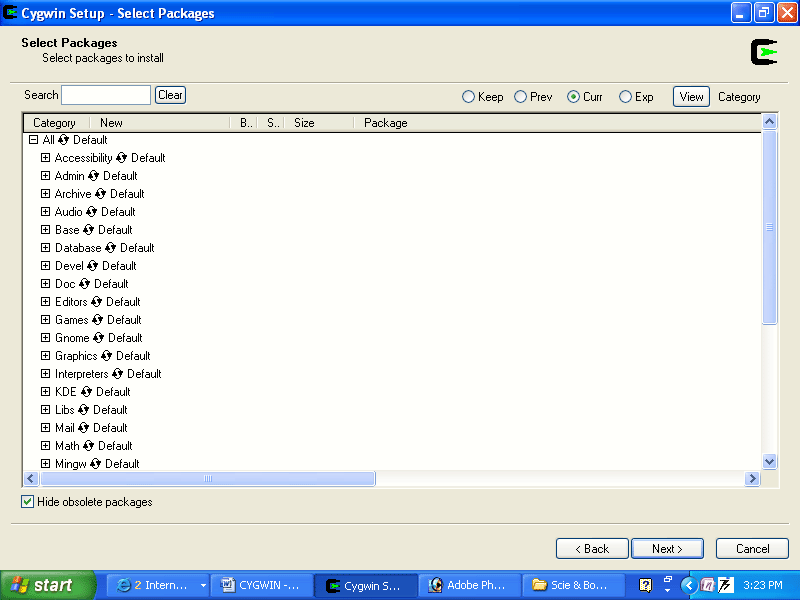
8. Select Packages: If you wish to do a full installation, click on the rotating selector next to "All" (at the top of the Category list) so that the indicator to its right changes from "Default" to "Install".Click Next and skip ahead to step 10.


9. If you wish to do a custom installation, click the View button so that the indicator to its right changes from "Category" to "Full".


To select a package for installation, click on its rotating selector (in the New column) to cycle through the available choices until a version number appears. In most cases, you should choose the highest version number from those that are available. When you have completed your selections,

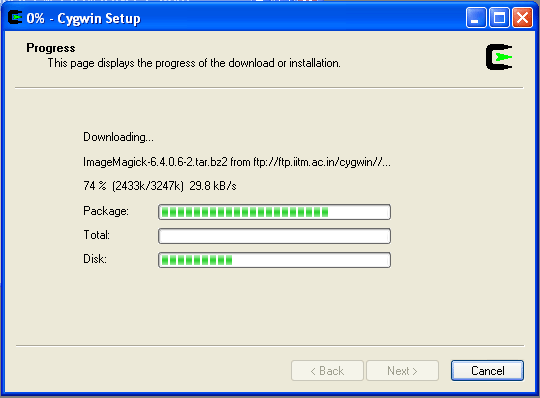
10. Click next. The downloading process begins once the packages have been selected. The installer indicates its progress.


Once all selected package files have been downloaded and checked, they are unpacked into the Cygwin root install directory.


11. Create Icons: Unless these icons already exist from a previous Cygwin installation, make sure the boxes are checked and click Finish.

Using Cygwin

Pathnames of files are often confusing to new Cygwin users. A pathname is simply a set of directions for locating file. An absolute pathname begins at a fixed location (the root of the file system). The confusion arises because native Windows programs use c:\ as their root, and Cygwin programs use c:\cygwin.

If you need to use a Cygwin program to read or write a file located outside of c:\cygwin, you can use a pathname beginning with /cygdrive/c/ for this purpose.

The installation directory (by default, c:\cygwin) is the root of the Unix-like file system, which contains bin, etc, home, tmp, and usr directories as would be found on a GNU/Linux or other Unix system. Within home will be one or more subdirectories, each allocated to a Windows user.


To begin, click on the Cygwin desktop icon,


or choose the Cygwin entry from your start menu, to open a Cygwin terminal window. Initially, the current (working) directory is /home/user, where user is your Windows login name.

Test Cygwin and installed packages:

Type the following commands:

$ ls -l     (list files in current directory)
$ cygcheck -c     (list installed packages in alphabetic order)
$ cd c:     (change to C-directory) 

Test the C compiler: 

$ gcc --version     (compiler version)
$ gcc --help     (for a list of options)

Test the C++ compiler:

$ g++ --version     (compiler version)
$ g++ --help     (for a list of options)


 Test the Fortran compiler:

$ g77 --version     (compiler version)
$ g77 --help     (for a list of options)

Test Python:
$ python


Jan 5, 2011

Drug discovery

This is a list of free online servers that can be used in the drug discovery research. Together, with the research software listed in the free software section, these free resources can be be used as an alternative to commercial software. I have included softwares that can be used for specific purposes for eg: docking, as well as many online servers that can do the job. I have also listed a package which can almost do all aspect drug designing Eg:Open Eye. Hope this helps....

Drug designing steps were usually divided into steps as follows:

LIGAND PREPARATION

RECEPTOR PREPARATION

DOCKING

BINDING AFFINITY STUDIES

Ligand preparation:

Ligand preparation can be subdivided into ligand retrieval or collection, liand conversion and ligand analysis.

Ligand retrievel:

This involves retrieving information from various chemical databases .

Drug Bank

The DrugBank database is a unique bioinformatics and cheminformatics research resource that combines detailed drug (i.e. chemical, pharmacological and pharmaceutical) data with comprehensive drug target (i.e. sequence, structure, and pathway) information.

http://www.drugbank.ca/

Chembank

ChemBank is intended to guide chemists synthesizing novel compounds or libraries, to assist biologists searching for small molecules that perturb specific biological pathways, and to catalyze the process by which drug hunters discover new and effective medicines.

http://chembank.broadinstitute.org/welcome.htm

Pubchem

PubChem provides information on the biological activities of small molecules. It is a component of NIH's Molecular Libraries Roadmap Initiative.

http://pubchem.ncbi.nlm.nih.gov/

Ligand Expo

Ligand Expo (formerly Ligand Depot) provides chemical and structural information about small molecules within the structure entries of the Protein Data Bank. Tools are provided to search the PDB dictionary for chemical components, to identify structure entries containing particular small molecules, and to download the 3D structures of the small molecule components in the PDB entry.

http://ligand-expo.rcsb.org/ld-search.html

Ligand conversion tools:

Smileconvertor

This online server can be used to convert smiles into PDB, SDF, Mol formats and both in 2D and 3D formats.

http://cactus.nci.nih.gov/services/translate/

Cornia

This tool was used to generate 3D structures in SDF format.

http://www.molecular-networks.com/online_demos/index.html

Prodrug

This WWW PRODRG server will convert coordinates for small molecules in PDB format to the following topology formats: GROMOS, GROMACS, WHAT IF, REFMAC5, CNS, O, SHELX, HEX and MOL2. In addition, coordinates for hydrogen atoms are generated. You can now also sketch your small molecule in a simple text editor, and paste this into the window below

http://davapc1.bioch.dundee.ac.uk/prodrg/

Ligand analysis tools:

Molinspiration

Molinspiration offers a molecular processing and property calculation toolkit written in Java. Calculated molecular descriptors may be used for property based virtual screening of large collections of molecules to discard structures with not drug-like properties and to pick potential drug candidates.

http://www.molinspiration.com/cgi-bin/properties


E-Dragon

E-DRAGON is the electronic remote version of the well known software DRAGON, which is an application for the calculation of molecular descriptors developed by the Milano Chemometrics and QSAR Research Group of Prof. R. Todeschini. These descriptors can be used to evaluate molecular structure-activity or structure-property relationships, as well as for similarity analysis and highthroughput screening of molecule databases. DRAGON provides more than 1,600 molecular descriptors that are divided into 20 logical blocks. The user can calculate not only the simplest atom type, functional group and fragment counts, but also several topological and geometrical descriptors.

http://www.vcclab.org/lab/edragon/start.html

Model (Molecular Descriptor Lab)

A server Computing structural and physichemical properties of molecules from their 3D structures.

http://jing.cz3.nus.edu.sg/cgi-bin/model/model.cgi

MOLEDB:

Molecular Descriptors Data Base is a free on-line database comprised of 1124 molecular descriptors calculated for 234773 molecules. At the present moment, 7159 queries have been made on the database. This data base is intended as a research and teaching tool.

http://michem.disat.unimib.it/mole_db/

Receptor preparation and target determination:

Many of the drug act by binding to a target such as hormone or receptor. Before target determination the TARGET should be prepared by structure modeling method or it might be download from the structure databases. After modeling or downloading from corresponding sources, it should be prepared properly for docking which might be achieved by using binding site analysis tools and target determination tools.

Binding site analysis:

MEDock

The MEDock (Maximum-Entropy based Docking) web server is aimed at providing an efficient utility for prediction of ligand binding site for researchers.

http://bioinfo.mc.ntu.edu.tw/medock/documentation.html

ImprintPocket

A server for calculating Protein Pocket Negtive Image.

http://sts.bioengr.uic.edu/pni/


castP

Binding sites and active sites of proteins and DNAs are often associated with structural pockets and cavities. castP server uses the weighted Delaunay triangulation and the alpha complex for shape measurements. It provides identification and measurements of surface accessible pockets as well as interior inaccessible cavities, for proteins and other molecules. It measures analytically the area and volume of each pocket and cavity, both in solvent accessible surface (SA, Richards' surface) and molecular surface (MS, Connolly's surface). It also measures the number of mouth openings, area of the openings, circumference of mouth lips, in both SA and MS surfaces for each pocket.

http://sts.bioengr.uic.edu/castp/index.php

ODA

ODA (Optimal Docking Areas) is a new method to predict protein-protein interaction sites on protein surfaces. It identifies optimal surface patches with the lowest docking desolvation energy values as calculated by atomic solvation parameters (ASP) derived from octanol/water transfer experiments and adjusted for protein-protein docking.

http://www.molsoft.com/oda.cgi


Target identification:

TarFisDock :

Given a small molecule which can be drug, drug candidate, natural product, or new synthetic compound, TarFisDock docks it into the protein targets in PDTD (Potential Drug Target Database), and outputs the top 2%, 5% or 10% candidates ranked by the energy score, including their binding conformations and a table of the related target information.

http://www.dddc.ac.cn/tarfisdock/index.php

Therapeutic Target Database

A database to provide information about the known and explored therapeutic protein and nucleic acid targets, the targeted disease, pathway information and the corresponding drugs directed at each of these targets. Also included in this database are links to relevant databases containing information about target function, sequence, 3D structure, ligand binding properties, enzyme nomenclature and drug structure, therapeutic class, clinical development status. All information provided are fully referenced.

http://bidd.nus.edu.sg/group/cjttd/ttd.asp

Binding DB:

BindingDB provides virtual screening tools to help identify the compounds in your own compound catalog that are most likely to be active against a desired target.

http://www.bindingdb.org/bind/vsOverview.jsp

Docking

Protein-ligand docking

parDock

ParDOCK is an all-atom energy based Monte Carlo,rigid protein ligand docking, implemented in a fully automated, parallel processing mode which predicts the binding mode of the ligand in receptor target site.

http://www.scfbio-iitd.res.in/dock/pardock.jsp

Patch dock:


http://bioinfo3d.cs.tau.ac.il/PatchDock/

Protein- protein docking:

Cluspro

http://cluspro.bu.edu/login.php

Fire Dock

FireDock is an efficient method for refinement and re-scoring of rigid-body protein-protein docking solutions.

http://bioinfo3d.cs.tau.ac.il/FireDock/index.html

Gramm

GRAMM is a program for protein docking. To predict the structure of a complex, it requires only the atomic coordinates of the two molecules (no information about the binding sites is needed). The program performs an exhaustive 6-dimensional search through the relative translations and rotations of the molecules.

http://vakser.bioinformatics.ku.edu/resources/gramm/grammx/

Z-DOCK

http://zdock.bu.edu/

HEX

This is an online server for protein docking and molecular superposition program HEX.

http://hexserver.loria.fr/


Binding Affinity Analysis:

PEARLS:

Program of Energetic Analysis of Receptor Ligand System (PEARL) is a server for computing small molecule ligand-protein, ligand-nucleic acid, protein-nucleic acid and ligand-protein-nucleic acid interaction energies.

http://ang.cz3.nus.edu.sg/cgi-bin/prog/rune.pl

AffinDB:

AffinDB is a database of affinity data for structurally resolved protein–ligand complexes from the Protein Data Bank (PDB).

http://www.agklebe.de/affinity

Drugscore:

DrugScoreONLINE is a web-based user interface for the knowledge-based scoring functions DrugScoreCSD and DrugScorePDB. DrugScoreONLINE enables researcher to score protein-ligand complexes of your interest and to visualize the per-atom score contributions.

http://pc1664.pharmazie.uni-marburg.de/drugscore/

Dec 31, 2010

Python for Beginners

To get started with Python,

Download python.

An installer program is available for windows platform, as well as source code is available for other platforms. Alternatively, you can download active python a free, all-in-one python distribution that has everything you need to run python on window. Depending on the Operating system one is using it will show download link as shown below.


 The version of python you should download depends on whether you have 64 or 32 bit machine. To find out if your computer is running 32-bit or 64-bit windows do the following:
  • Go to the Start menu, and click on Programs -> Accessories -> System Tools -> System Information

The System Information tool will display detailed information about your Windows operating system. Once opened it will show the "System Summary" – it’s an overview of your computer and operating system.

The value of this item will tell you whether your computer is 32-bit or 64-bit:

              x86-based PC: It’s a 32-bit computer.
               x64-based PC: It’s a 64-bit computer.


When you click on the blue bar, Python should begin downloading. The file you downloaded is called “ActivePython-(your version number)-win32-x86.msi.”
 
  • Double-click on the ActivePython file.
 
  • ActiveState box comes up and tells you it’s going to install ActivePython. Click Next.
  •  Licensing Agreement. Check the Accept box. Click Next.
  • Then a dialogue box opens up allowing you to customize the installation. Don’t customize it. Click Next.
  • Finally you will see the “Install” click it. Done. Now the python userguide appears.
  • Open the Start menu, and click on Programs -> ActiveState> ActivePython
  • Submenu appears with various option. You want the one that says: “IDLE (Python GUI)” Click on it.
  • Now the command prompt of python appears. You are ready to communicate.
  • Your cursor will be blinking just to the right of a prompt that looks like this: >>>
  • Now type in the following command

    >>> print “Hello World!”


You will learn more about this command in the programming book. And make sure that “Hello World!” is inside quotation marks. Press Enter. You should see Hello World! appear in a different-colored font on the line below.

You are done with the installation. Ready to go……

Note: If you get an error message that says: “SyntaxError: invalid syntax” then you either forgot the quotation marks or you installed higher version of Python version, which uses a different print command.

1) For those of you who are new to the field of programming I strongly recommend this book


Non-Programmer's Tutorial for Python 2.6


A byte of python by Swaroop C.H., is a book on programming with python for people with no previous programming experience.

Byte of Python


>> continue reading: Python version for scientific computation > Enthought Python